1.我的主题设置JSON
{"argon_theme_color":"#2196f3","argon_theme_color_hex_preview":"#2196f3","argon_show_customize_theme_color_picker":true,"argon_enable_immersion_color":"true","argon_darkmode_autoswitch":"time","argon_enable_amoled_dark":"false","argon_card_radius":"15","argon_card_shadow":"default","argon_page_layout":"double","argon_article_list_waterflow":"1","argon_article_list_layout":"1","argon_font":"sans-serif","argon_assets_path":"jsdelivr_fastly","argon_custom_assets_path":"","argon_wp_path":"/","argon_dateformat":"YMD","argon_enable_headroom":"true","argon_toolbar_title":"--hidden--","argon_toolbar_icon":"http://tuchuang.shifengzhi.asia/picture/20240328193519.jpg","argon_toolbar_icon_link":"http://www.shifengzhi.top/showee.html","argon_toolbar_blur":"true","argon_banner_title":"","argon_banner_subtitle":"Life is coding, I will debug it.","argon_banner_size":"fullscreen","argon_page_background_banner_style":"transparent","argon_show_toolbar_mask":true,"argon_banner_background_url":"","argon_banner_background_color_type":"shape-primary","argon_banner_background_hide_shapes":true,"argon_enable_banner_title_typing_effect":"true","argon_banner_typing_effect_interval":"100","argon_page_background_url":"","argon_page_background_dark_url":"","argon_page_background_opacity":"0.9","argon_sidebar_banner_title":"码喽","argon_sidebar_banner_subtitle":"--hitokoto--","argon_sidebar_auther_name":"世风至","argon_sidebar_auther_image":"http://tuchuang.shifengzhi.asia/picture/20240328201115.png","argon_sidebar_author_description":"一只平凡的CV程序猿","argon_sidebar_announcement":"","argon_fab_show_settings_button":"false","argon_fab_show_darkmode_button":"true","argon_fab_show_gotocomment_button":"true","argon_seo_description":"","argon_seo_keywords":"","argon_article_meta":"time|categories|views|author|edittime","argon_show_readingtime":"true","argon_reading_speed":"580","argon_reading_speed_en":"80","argon_reading_speed_code":"10","argon_show_thumbnail_in_banner_in_content_page":"false","argon_first_image_as_thumbnail_by_default":"false","argon_reference_list_title":"参考","argon_show_sharebtn":"true","argon_show_headindex_number":"false","argon_donate_qrcode_url":"","argon_additional_content_after_post":"山水有相逢,我们江湖再见!じゃな~","argon_related_post":"category,tag","argon_related_post_sort_orderby":"meta_value_num","argon_related_post_sort_order":"DESC","argon_related_post_limit":"10","argon_article_header_style":"article-header-style-1","argon_outdated_info_time_type":"createdtime","argon_outdated_info_days":"31","argon_outdated_info_tip_type":"inpost","argon_outdated_info_tip_content":"本文最后更新于%modify_date_delta% 天前,其中的信息可能已经过时,如有错误请评论留言","argon_archives_timeline_show_month":"true","argon_archives_timeline_url":"http://www.shifengzhi.top/?page_id=101","argon_footer_html":"","argon_enable_code_highlight":"true","argon_code_theme":"vs2015","argon_code_highlight_hide_linenumber":"true","argon_code_highlight_break_line":"true","argon_code_highlight_transparent_linenumber":"false","argon_math_render":"none","argon_mathjax_cdn_url":"//cdn.jsdelivr.net/npm/mathjax@3/es5/tex-chtml-full.js","argon_mathjax_v2_cdn_url":"//cdn.jsdelivr.net/npm/mathjax@2.7.5/MathJax.js?config=TeX-AMS_HTML","argon_katex_cdn_url":"//cdn.jsdelivr.net/npm/katex@0.11.1/dist/","argon_enable_lazyload":"true","argon_lazyload_threshold":"800","argon_lazyload_effect":"fadeIn","argon_lazyload_loading_style":"1","argon_enable_fancybox":"true","argon_enable_zoomify":"false","argon_zoomify_duration":"200","argon_zoomify_easing":"cubic-bezier(0.4,0,0,1)","argon_zoomify_scale":"0.9","argon_enable_pangu":"article","argon_custom_html_head":"<video\nsrc=\"http://tuchuang.shifengzhi.asia/picture/showee-bg.mp4\" /*白天动态视频链接*/\nclass=\"bg-video bg-video-day\"\nautoplay=\"autoplay\"\nloop=\"loop\"\nmuted=\"\"\n>\n</video>\n<video\nsrc=\"http://tuchuang.shifengzhi.asia/picture/showee-bg.mp4\" /*夜间动态视频链接*/\nclass=\"bg-video bg-video-night\"\nautoplay=\"autoplay\"\nloop=\"loop\"\nmuted=\"\"\n>\n</video>\n<style>\n video.bg-video {\n position: fixed;\n z-index: -1;\n left: 0;\n right: 0;\n top: 0;\n bottom: 0;\n width: 100vw;\n height: 100vh;\n object-fit: cover;\n pointer-events: none;\n }\n html.darkmode video.bg-video.bg-video-day {\n opacity: 0;\n }\n html.darkmode video.bg-video.bg-video-night {\n opacity: 1;\n }\n video.bg-video.bg-video-day {\n opacity: 1;\n }\n video.bg-video.bg-video-night {\n opacity: 0;\n }\n #banner,\n #banner .shape {\n background: transparent !important;\n }\n</style>\n\n<script\n src=\"https://api.gcxstudio.cn/odometer/odometer.min.js\"\n integrity=\"sha256-65R1G5irU1VT+k8L4coqgd3saSvO/Wufson/w+v2Idw=\"\n crossorigin=\"anonymous\"\n></script>\n\n<link rel=\"stylesheet\" href=\"https://cdn.jsdelivr.net/npm/aplayer/dist/APlayer.min.css\">\n<script src=\"https://cdn.jsdelivr.net/npm/aplayer/dist/APlayer.min.js\"></script>\n\n<div id='aplayer'></div>\n","argon_custom_html_foot":"<link rel=\"stylesheet\" href=\"https://cdn.jsdelivr.net/npm/aplayer/dist/APlayer.min.css\">\n<script src=\"https://cdn.jsdelivr.net/npm/aplayer/dist/APlayer.min.js\"></script>\n<script src=\"https://cdn.jsdelivr.net/npm/meting@2.0.1/dist/Meting.min.js\"></script>\n\n<meting-js\n server=\"netease\"\n type=\"playlist\"\n id=\"2867436949\"\n fixed=\"true\"\n mini=\"true\"\n loop=\"all\"\n order=\"list\"\n preload=\"auto\"\n mutex=\"true\"\n lrc-type=\"0\"\n listFolded=\"true\">\n</meting-js>","argon_enable_smoothscroll_type":"1","argon_enable_into_article_animation":"true","argon_disable_pjax_animation":"false","argon_comment_pagination_type":"page","argon_comment_emotion_keyboard":"true","argon_hide_name_email_site_input":"false","argon_comment_need_captcha":"false","argon_get_captcha_by_ajax":"false","argon_comment_allow_markdown":"true","argon_comment_allow_editing":"true","argon_comment_allow_privatemode":"true","argon_comment_allow_mailnotice":"true","argon_comment_mailnotice_checkbox_checked":true,"argon_comment_enable_qq_avatar":"true","argon_comment_avatar_vcenter":"true","argon_who_can_visit_comment_edit_history":"commentsender","argon_enable_comment_pinning":"true","argon_enable_comment_upvote":"true","argon_comment_ua":"platform,browser","argon_show_comment_parent_info":"true","argon_fold_long_comments":"true","argon_gravatar_cdn":"gravatar.pho.ink/avatar/","argon_text_gravatar":"true","argon_enable_search_filters":"true","argon_search_filters_type":"*post,*page,shuoshuo","argon_pjax_disabled":"false","argon_hide_categories":"","argon_enable_login_css":"true","argon_home_show_shuoshuo":"false","argon_fold_long_shuoshuo":"true","argon_enable_timezone_fix":"false","argon_hide_shortcode_in_preview":"true","argon_trim_words_count":"80","argon_enable_mobile_scale":"false","argon_disable_googlefont":"false","argon_disable_codeblock_style":"false","argon_update_source":"github","argon_hide_footer_author":"false"}可复制,在如下位置一键导入

2.年度倒计时显示(左侧栏小工具)
在左侧栏小工具中添加简码,如下所示


简码中粘贴如下代码:
<div class="progress-wrapper" style="padding: 0">
<div class="progress-info">
<div class="progress-label">
<span id="yearprogress_yearname"></span>
</div>
<div id="yearprogress_text_container" class="progress-percentage">
<span id="yearprogress_progresstext"></span>
<span id="yearprogress_progresstext_full"></span>
</div>
</div>
<div class="progress">
<div id="yearprogress_progressbar" class="progress-bar bg-primary"></div>
</div>
</div>
<script no-pjax="">
function yearprogress_refresh() {
let year = new Date().getFullYear();
$("#yearprogress_yearname").text(year);
let from = new Date(year, 0, 1, 0, 0, 0);
let to = new Date(year, 11, 31, 23, 59, 59);
let now = new Date();
let progress = (((now - from) / (to - from + 1)) * 100).toFixed(7);
let progressshort = (((now - from) / (to - from + 1)) * 100).toFixed(2);
$("#yearprogress_progresstext").text(progressshort + "%");
$("#yearprogress_progresstext_full").text(progress + "%");
$("#yearprogress_progressbar").css("width", progress + "%");
}
yearprogress_refresh();
if (typeof yearProgressIntervalHasSet == "undefined") {
var yearProgressIntervalHasSet = true;
setInterval(function () {
yearprogress_refresh();
}, 500);
}
</script>
<style>
#yearprogress_text_container {
width: 100%;
height: 22px;
overflow: hidden;
user-select: none;
}
#yearprogress_text_container > span {
transition: all 0.3s ease;
display: block;
}
#yearprogress_text_container:hover > span {
transform: translateY(-45px);
}
</style>
然后在下面添加一个日历模块,左侧栏就是上面倒计时下面显示日历了,效果如下:

3.动态视频背景
背景可以通过更改 url 链接设置为自己的动态视频,尽量不要太大,否则会导致网站显示时加载时间过长或视频背景无法显示等问题
正常情况下,视频不宜超过 8 秒,但可将视频压缩后上传,时长可稍长一点点
可将代码粘贴到如下位置:

<video
src="http://tuchuang.shifengzhi.asia/picture/showee-bg.mp4" /*白天动态视频链接*/
class="bg-video bg-video-day"
autoplay="autoplay"
loop="loop"
muted=""
>
</video>
<video
src="http://tuchuang.shifengzhi.asia/picture/showee-bg.mp4" /*夜间动态视频链接*/
class="bg-video bg-video-night"
autoplay="autoplay"
loop="loop"
muted=""
>
</video>
<style>
    video.bg-video {
        position: fixed;
        z-index: -1;
        left: 0;
        right: 0;
        top: 0;
        bottom: 0;
        width: 100vw;
        height: 100vh;
        object-fit: cover;
        pointer-events: none;
    }
    html.darkmode video.bg-video.bg-video-day {
        opacity: 0;
    }
    html.darkmode video.bg-video.bg-video-night {
        opacity: 1;
    }
    video.bg-video.bg-video-day {
        opacity: 1;
    }
    video.bg-video.bg-video-night {
        opacity: 0;
    }
    #banner,
    #banner .shape {
        background: transparent !important;
    }
</style>

<script
    src="https://api.gcxstudio.cn/odometer/odometer.min.js"
    integrity="sha256-65R1G5irU1VT+k8L4coqgd3saSvO/Wufson/w+v2Idw="
    crossorigin="anonymous"
></script>

<link rel="stylesheet" href="https://cdn.jsdelivr.net/npm/aplayer/dist/APlayer.min.css">
<script src="https://cdn.jsdelivr.net/npm/aplayer/dist/APlayer.min.js"></script>

<div id='aplayer'></div>
4.顶部导航栏(页面与菜单及链接)
页面
几个基本页面都比较简单,在页面里选择新增页面,然后选择对应的模板的即可,名字自己随意起,如下:

如果你安装了WP Githuber MD这个插件,需要在设置里设一下,方便用原生编辑器编辑页面,设置如下,只勾选文章:

需要注意的是,想要展示评论的页面需要在页面的快速编辑里勾选上允许评论选项,如下:

友情链接
对于友情链接页面与其他常规页面不同,这里简单说一下:
友情链接页面使用默认模板,并添加一个简码



按照链接评级排序,友情链接的页面内容通过编辑链接实现
在链接中点击添加链接,内容可尝试先按如下填写,添加一个我的友链
站点名称:世风至
站点地址:http://www.shifengzhi.top/showee.html
站点描述:人生无根蒂,飘如陌上尘
站点图标:http://tuchuang.shifengzhi.asia/picture/20240328201115.png

编辑完成后点击添加链接保存
菜单
页面设置好后就可以在菜单里设置让其显示出来了,进入菜单


上图所示,按自己喜好编辑调整,错后为子项目,编辑完成后点击保存菜单,去到博客页面就可以看到顶部导航栏了
如果你想让导航栏文字前面像我一样整个图标,可以在导航标签里编辑添加,为了美观一点可以在图标和文字间添加一个空格,如下:

<i class="fa fa-xxx"></i>注:xxx 是指图标的名称,具体可查看官方文档:https://argon-docs.solstice23.top/#/icon
图标名称可查看图标库:https://fontawesome.com/v4/icons/
5.底部音乐播放
可将代码粘贴到如下位置:

<link rel="stylesheet" href="https://cdn.jsdelivr.net/npm/aplayer/dist/APlayer.min.css">
<script src="https://cdn.jsdelivr.net/npm/aplayer/dist/APlayer.min.js"></script>
<script src="https://cdn.jsdelivr.net/npm/meting@2.0.1/dist/Meting.min.js"></script>

<meting-js
    server="netease"
    type="playlist"
    id="2867436949"
    fixed="true"
    mini="true"
    loop="all"
    order="list"
    preload="auto"
    mutex="true"
    lrc-type="0"
    listFolded="true">
</meting-js>
server="netease" 指定音乐平台为网易云,type="song" 指单曲类型,id="7373135320" 为音乐的 id(这里的 id 为打开音乐歌单,网址显示的 id)
开启吸底模式 fixed="true", 开启迷你模式 mini="true", 随机播放 order="random", 关闭底部歌词 lrc-type="0"
注意:id 需要为自己创建的歌单,不能为我喜欢的音乐;server 可以改自己用的音乐平台,如 netease (网易云)、tencent (QQ 音乐)
具体参数设置点击此链接:https://yy.liveout.cn/article/Learn/front-end/aplayer%E5%8F%82%E6%95%B0.png
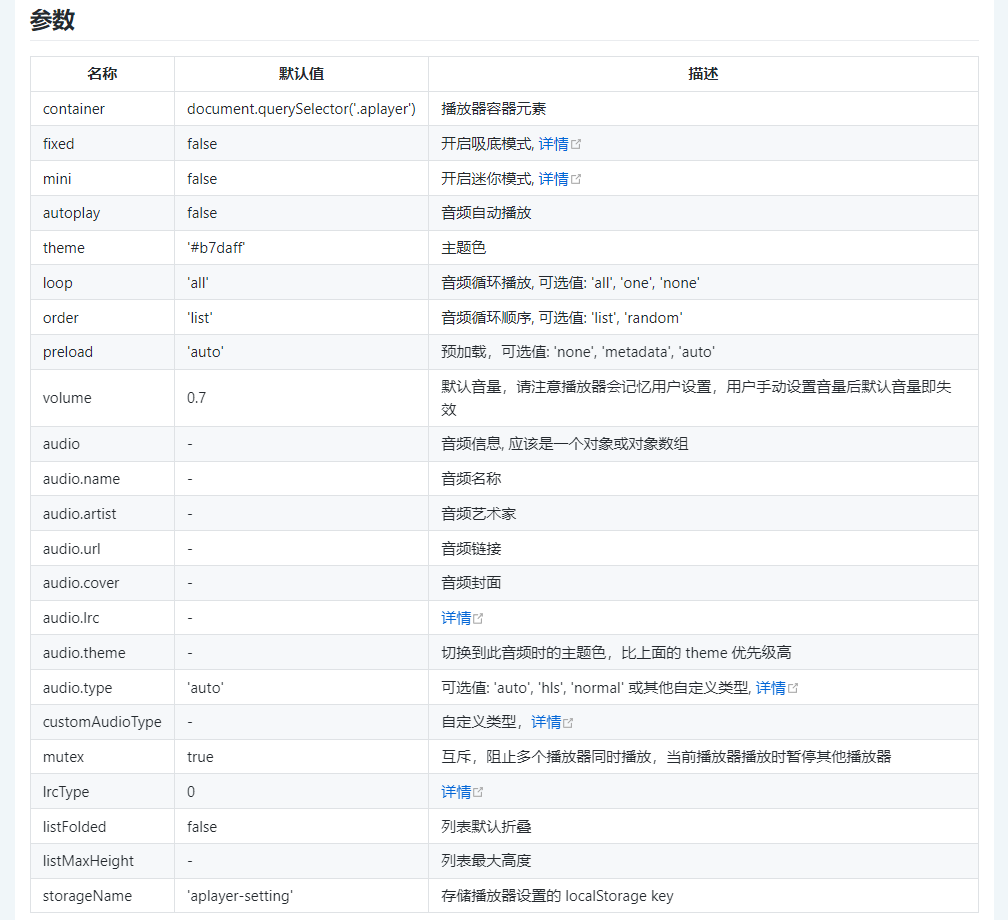
Aplayer 播放器官网文档:APlayer HTML5 音乐播放器 | ACE-BLOG (ace520.github.io)
6.博客自定义CSS样式

上图粘贴如下代码:
/*网站字体*/
/*原则上你可以设置多个字体,然后在不同的部位使用不同的字体。*/
@font-face{
    font-family:echo;
src:url(https://fastly.jsdelivr.net/gh/huangwb8/bloghelper@latest/fonts/13.woff2) format('woff2')
}

body{
        font-family: 'echo', Georgia, -apple-system, 'Nimbus Roman No9 L', 'PingFang SC', 'Hiragino Sans GB', 'Noto Serif SC', 'Microsoft Yahei', 'WenQuanYi Micro Hei', 'ST Heiti', sans-serif
}

/*横幅字体大小*/
.banner-title {
  font-size: 2.5em;
}
.banner-subtitle{
  font-size: 28px;

    -webkit-text-fill-color: transparent;
background: linear-gradient(94.75deg,rgb(60, 172, 247) 0%,rgb(131, 101, 253) 43.66%,                rgb(255, 141, 112) 64.23%,rgb(247, 201, 102) 83.76%,rgb(172, 143, 100) 100%);
-webkit-background-clip: text;
}

/*文章标题字体大小*/
.post-title {
    font-size: 25px
}

/*正文字体大小(不包含代码)*/
.post-content p{
    font-size: 1.25rem;
}
li{
    font-size: 1.2rem;

}

/*评论区字体大小*/
p {
    font-size: 1.2rem

}

/*评论发送区字体大小*/
.form-control{
    font-size: 1.2rem
}

/*评论勾选项目字体大小*/
.custom-checkbox .custom-control-input~.custom-control-label{
    font-size: 1.2rem
}
/*评论区代码的强调色*/
code {
  color: rgba(var(--themecolor-rgbstr));
}

/*说说字体大小和颜色设置*/
.shuoshuo-title {
    font-size: 25px;
/*  color: rgba(var(--themecolor-rgbstr)); */
}

/*尾注字体大小*/
.additional-content-after-post{
    font-size: 1.2rem
}

/* 公告居中 */
.leftbar-announcement-title {
    font-size: 20px;
/*     text-align: center; */
                color: #00FFFF
}

.leftbar-announcement-content {
    font-size: 15px;
    line-height: 1.8;
    padding-top: 8px;
    opacity: 0.8;
/*     text-align: center; */
            color:#00FFFF;
}

/* 一言居中 */
.leftbar-banner-title {
    font-size: 20px;
    display: block;
    text-align: center;
        opacity: 0.8;
}

/* 个性签名居中 */
.leftbar-banner-subtitle {
    margin-top: 15px;
    margin-bottom: 8px;
    font-size: 13px;
    opacity: 0.8;
    display: block;
    text-align: center;
}

/*========颜色设置===========*/

/*文章或页面的正文颜色*/
body{
    color:#364863
}

/*引文属性设置*/
blockquote {
    /*添加弱主题色为背景色*/
    background: rgba(var(--themecolor-rgbstr), 0.1) !important;
    width: 100%
}

/*引文颜色 建议用主题色*/
:root {
    /*也可以用类似于--color-border-on-foreground-deeper: #009688;这样的命令*/
    --color-border-on-foreground-deeper: rgba(var(--themecolor-rgbstr));
}

/*左侧菜单栏突出颜色修改*/
.leftbar-menu-item > a:hover, .leftbar-menu-item.current > a{
    background-color: #f9f9f980;
}

/*站点概览分隔线颜色修改*/
.site-state-item{
    border-left: 1px solid #aaa;
}
.site-friend-links-title {
    border-top: 1px dotted #aaa;
}
#leftbar_tab_tools ul li {
    padding-top: 3px;
    padding-bottom: 3px;
    border-bottom:none;
}
html.darkmode #leftbar_tab_tools ul li {
    border-bottom:none;
}

/*左侧栏搜索框的颜色*/
button#leftbar_search_container {
    background-color: transparent;
}

/*========透明设置===========*/

/*白天卡片背景透明*/
.card{
    background-color:rgba(255, 255, 255, 0.8) !important;
    /*backdrop-filter:blur(6px);*//*毛玻璃效果主要属性*/
    -webkit-backdrop-filter:blur(6px);
}

/*小工具栏背景完全透明*/
/*小工具栏是card的子元素,如果用同一个透明度会叠加变色,故改为完全透明*/
.card .widget,.darkmode .card .widget,#post_content > div > div > div.argon-timeline-card.card.bg-gradient-secondary.archive-timeline-title{
    background-color:#ffffff00 !important;
    backdrop-filter:none;
    -webkit-backdrop-filter:none;
}
.emotion-keyboard,#fabtn_blog_settings_popup{
    background-color:rgba(255, 255, 255, 0.95) !important;
}

/*分类卡片透明*/
.bg-gradient-secondary{
    background:rgba(255, 255, 255, 0.1) !important;
    backdrop-filter: blur(10px);
    -webkit-backdrop-filter:blur(10px);
}

/*夜间透明*/
html.darkmode.bg-white,html.darkmode .card,html.darkmode #footer{
    background:rgba(66, 66, 66, 0.9) !important;
}
html.darkmode #fabtn_blog_settings_popup{
    background:rgba(66, 66, 66, 0.95) !important;
}

/*标签背景
.post-meta-detail-tag {
    background:rgba(255, 255, 255, 0.5)!important;
}*/

/*========排版设置===========*/

/*左侧栏层级置于上层*/
#leftbar_part1 {
    z-index: 1;
}

/*分类卡片文本居中*/
#content > div.page-information-card-container > div > div{
    text-align:center;
}

/*子菜单对齐及样式调整*/
.dropdown-menu .dropdown-item>i{
    width: 10px;
}
.dropdown-menu>a {
    color:var(--themecolor);
}
.dropdown-menu{
    min-width:max-content;
}
.dropdown-menu .dropdown-item {
    padding: .5rem 1.5rem 0.5rem 1rem;
}
.leftbar-menu-subitem{
    min-width:max-content;
}
.leftbar-menu-subitem .leftbar-menu-item>a{
    padding: 0rem 1.5rem 0rem 1rem;
}

/*左侧栏边距修改*/
.tab-content{
    padding:10px 0px 0px 0px !important;
}
.site-author-links{
    padding:0px 0px 0px 10px ;
}
/*目录位置偏移修改*/
#leftbar_catalog{
    margin-left: 0px;
}
/*目录条目边距修改*/
#leftbar_catalog .index-link{
    padding: 4px 4px 4px 4px;
}
/*左侧栏小工具栏字体缩小*/
#leftbar_tab_tools{
    font-size: 14px;
}

/*正文图片边距修改*/
article figure {margin:0;}
/*正文图片居中显示*/
.fancybox-wrapper {
    margin: auto;
}
/*正文表格样式修改*/
article table > tbody > tr > td,
article table > tbody > tr > th,
article table > tfoot > tr > td,
article table > tfoot > tr > th,
article table > thead > tr > td,
article table > thead > tr > th{
    padding: 8px 10px;
    border: 1px solid;
}
/*表格居中样式*/
.wp-block-table.aligncenter{margin:10px auto;}

/*回顶图标放大*/
button#fabtn_back_to_top, button#fabtn_go_to_comment, button#fabtn_toggle_blog_settings_popup, button#fabtn_toggle_sides, button#fabtn_open_sidebar{
    font-size: 1.2rem;
}

/*顶栏菜单放大*/
/*这里也可以设置刚刚我们设置的btfFont字体。试试看!*/

.navbar-nav .nav-link {
    font-size: 1rem;
    font-family: 'echo';

}
.navbar-brand {
    font-family: 'echo';
    font-size: 1.2rem;
    margin-right: 1.0 rem;
    padding-bottom: 0.2 rem;

    -webkit-text-fill-color: transparent;
background: linear-gradient(94.75deg,rgb(60, 172, 247) 0%,rgb(131, 101, 253) 43.66%,                rgb(255, 141, 112) 64.23%,rgb(247, 201, 102) 83.76%,rgb(172, 143, 100) 100%);
-webkit-background-clip: text;
}

/*菜单大小*/
.nav-link-inner--text {
    font-size: 1.25em;
}
.navbar-nav .nav-item {
    margin-right:0;
}
.mr-lg-5, .mx-lg-5 {
    margin-right:1rem !important;
}
.navbar-toggler-icon {
    width: 1.8rem;
    height: 1.8rem;
}
/*菜单间距*/
.navbar-expand-lg .navbar-nav .nav-link {
    padding-right: 1.4em;
    padding-left: 1.4em;
}

/*隐藏wp-SEO插件带来的线条阴影(不一定要装)*/
*[style='position: relative; z-index: 99998;'] {
    display: none;
}

/* Github卡片样式*/
.github-info-card-header a {
    /*Github卡片抬头颜色*/
    color: black !important;
    font-size: 1.5rem;
}
.github-info-card {
    /*Github卡片文字(非链接)*/
    font-size: 1rem;
    color: black !important;
}
.github-info-card.github-info-card-full.card.shadow-sm {
    /*Github卡片背景色*/
    background-color: rgba(var(--themecolor-rgbstr), 0.1) !important;
}

/*      左侧栏外观CSS     */

/* 头像 */
#leftbar_overview_author_image {
    width: 100px;
    height: 100px;
    margin: auto;
    background-position: center;
    background-repeat: no-repeat;
    background-size: cover;
    background-color: rgba(127, 127, 127, 0.1);
    overflow: hidden;
    transition: transform 0.3s ease;
}

/*  头像亮暗  */
#leftbar_overview_author_image:hover {
    transform: scale(1.23);
    filter: brightness(150%);
}

/* 名称 */
#leftbar_overview_author_name {
    margin-top: 15px;
    font-size: 18px;align-content;
    color:#00FFFF;
}

/* 简介 */
#leftbar_overview_author_description {
    font-size: 14px;
    margin-top: -4px;
    opacity: 0.8;
    color:#c21f30;
}

/* 标题,链接等 */
a, .btn-neutral {
    color:#AF7AC5 ;

}

/* 页脚透明 */
#footer {
    background: var(--themecolor-gradient);
    color: #fff;
    width: 100%;
    float: right;
    margin-bottom: 25px;
    text-align: center;
    padding: 25px 20px;
    line-height: 1.8;
    transition: none;
    opacity: 0.6;
}
7.头像缩放和亮暗
第 5 步同样位置粘贴如下代码:
#leftbar_overview_author_image {
    width: 100px;
    height: 100px;
    margin: auto;
    background-position: center;
    background-repeat: no-repeat;
    background-size: cover;
    background-color: rgba(127, 127, 127, 0.1);
    overflow: hidden;
    box-shadow: 0 0 5px rgba(116, 8, 204, 0.3);
    transition: transform 0.3s ease; /*变化速度*/
}

#leftbar_overview_author_image:hover {
    transform: scale(1.2); /*缩放大小*/
    filter: brightness(150%); /*调节亮度*/
}
8.鼠标样式与特效
外行建议谨慎操作,此处要编辑主题文件
如下位置:


<!--鼠标指针气泡特效 开始-->
<script>$.getScript("https://cdn.jsdelivr.net/gh/huangwb8/bloghelper@latest/mouse/joe/censor10.js");</script>
<!--鼠标指针特效2 结束-->

<!--鼠标指针气泡特效 开始-->
<style type="text/css">
.main-content img,body{cursor:url(https://cdn.jsdelivr.net/gh/huangwb8/bloghelper@latest/mouse/halo-dream/cursor/breeze/Arrow.cur),auto}.actions>div,.expand-done,.main-content figure>figcaption div,.navbar-above .navbar-nav .item,.navbar-searchicon,.navbar-slideicon,.photos .picture-details,.widget .ad-tag .click-close,a,button{cursor:url(https://cdn.jsdelivr.net/gh/huangwb8/bloghelper@latest/mouse/halo-dream/cursor/breeze/Hand.cur),auto}blockquote,code,h1,h2,h3,h4,h5,h6,hr,input[type=text],li,p,td,textarea,th{cursor:url(https://cdn.jsdelivr.net/gh/huangwb8/bloghelper@latest/mouse/halo-dream/cursor/breeze/IBeam.cur),auto}
</style>
<!--鼠标指针特效2 结束-->
以上只是最简单的一小部分,更全面的如下:
两个位置分成两个文件,方便管理,

- 在
</footer>标签之前的代码,即timeRAM.php的内容。
<!--耗时及占用内存开始-->
<span id="momk"></span><span id="momk" style="color: #ff0000;"></span>
<script type="text/javascript">
function NewDate(str) {
str = str.split('-');
var date = new Date();
date.setUTCFullYear(str[0], str[1] - 1, str[2]);
date.setUTCHours(0, 0, 0, 0);
return date;
}
function momxc() {
var birthDay =NewDate("2022-04-10");
var today=new Date();
var timeold=today.getTime()-birthDay.getTime();
var sectimeold=timeold/1000
var secondsold=Math.floor(sectimeold);
var msPerDay=24*60*60*1000; var e_daysold=timeold/msPerDay;
var daysold=Math.floor(e_daysold);
var e_hrsold=(daysold-e_daysold)*-24;
var hrsold=Math.floor(e_hrsold);
var e_minsold=(hrsold-e_hrsold)*-60;
var minsold=Math.floor((hrsold-e_hrsold)*-60); var seconds=Math.floor((minsold-e_minsold)*-60).toString();
document.getElementById("momk").innerHTML = "本站已安全运行:"+daysold+"天"+hrsold+"小时"+minsold+"分"+seconds+"秒<br>";
setTimeout(momxc, 1000);
}momxc();
</script>
<style>
#momk{animation:change 10s infinite;font-weight:800; }
@keyframes change{0%{color:#5cb85c;}25%{color:#556bd8;}50%{color:#e40707;}75%{color:#66e616;}100% {color:#67bd31;}}
</style>
<?php printf(' | 耗时 %.3f 秒 | 查询 %d 次 | 内存 %.2f MB |',timer_stop( 0, 3 ),get_num_queries(),memory_get_peak_usage() / 1024 / 1024);?><br>
<!--耗时及占用内存结束-->- 在
</body>标签之前的代码,即common.php的内容。
<!-- 用法
    在footer.php中</body>标签前引用下列命令即可:第一个!记得去掉!
    <!?php require('./specialEffects/common.php'); ?>
-->

<!-- 设备判断JS脚本
    用法:https://github.com/hgoebl/mobile-detect.js#readme
    也可至bloghelper取得: https://cdn.jsdelivr.net/gh/huangwb8/bloghelper@latest/js/mobile-detect.js
-->
<script src="https://bensz.onmicrosoft.cn/bloghelper/js/mobile-detect.js"></script>

<!--全页特效开始-->
<script type="text/javascript">

    // 设备检测
    var md = new MobileDetect(window.navigator.userAgent);

    // PC生效,手机/平板不生效
    // md.mobile(); md.phone();
    if(!md.phone()){

        if(!md.tablet()){

            // 雪花
            // $.getScript("https://bensz.onmicrosoft.cn/bloghelper/js/xiaxue.js");

            // 樱花
            // $.getScript("https://bensz.onmicrosoft.cn/bloghelper/js/yinghua.js");

            // 小烟花特效
            // $.getScript("https://bensz.onmicrosoft.cn/bloghelper/js/mouse-click.js");

            // 大烟花特效 z-index:217483647; pointer-events: none;
                $.getScript("https://cdn.jsdelivr.net/gh/huangwb8/bloghelper@latest/mouse/mouse-click-02/mouse-canvas.js");
            document.write('<style>#mouse-canvas {z-index:217483647; pointer-events: none;  box-sizing: border-box !important; display: block !important; position: fixed !important; left: 0; right: 0; top: 0; bottom: 0; width: 100%; height: 100vh;}</style>')

            // 鼠标移动的仙女棒特效
            // $.getScript("https://bensz.onmicrosoft.cn/bloghelper/mouse/halo-dream/fairyDustCursor.min.js");

        }

        // 春节灯笼
        document.write('<link href="https://bensz.onmicrosoft.cn/bloghelper/css/deng.css" rel="stylesheet">');
        document.write('<div class="deng-box"><div class="deng"><div class="xian"></div><div class="deng-a"><div class="deng-b"><div class="deng-t">春节</div></div></div><div class="shui shui-a"><div class="shui-c"></div><div class="shui-b"></div></div></div></div>');
        document.write('<div class="deng-box1"><div class="deng"><div class="xian"></div><div class="deng-a"><div class="deng-b"><div class="deng-t">快乐</div></div></div><div class="shui shui-a"><div class="shui-c"></div><div class="shui-b"></div></div></div></div>');

        // 随机图API之动态壁纸
        // document.write('<style type="text/css" id="wp-custom-css">#content:before{opacity: 0;}</style>');
        // document.write('<video src="https://blognas.hwb0307.com/imgapi/index-animated.php" class="bg-video" autoplay="" loop="loop" muted=""></video>');
        // document.write('<style> video.bg-video {position: fixed; z-index: -1;left: 0;right: 0;top: 0;bottom: 0;width: 100vw;height: 100vh; object-fit: cover;pointer-events: none;transition: opacity .3s ease;}</style>')
    }
</script>
<!--全页特效结束-->

<!--鼠标悬停3D效果start-->
<div class="article.post:not(.post-full)" data-tilt></div>
<div class=".shuoshuo-preview-container" data-tilt></div>
<script type="text/javascript" src="https://bensz.onmicrosoft.cn/bloghelper/vanilla3D/vanilla-tilt_v1.7.3.js"></script>
<script type="text/javascript">
    // 设备检测
    var md = new MobileDetect(window.navigator.userAgent);

    // PC生效,手机/平板不生效
    // md.mobile(); md.phone();
    if(!md.phone() && !md.tablet()){
        window.pjaxLoaded = function(){
            // 正文卡片
            VanillaTilt.init(document.querySelectorAll("article.post:not(.post-full)"),{
                reverse:                true,  // reverse the tilt direction
                max:                    8,     // max tilt rotation (degrees)
                startX:                 0,      // the starting tilt on the X axis, in degrees.
                startY:                 0,      // the starting tilt on the Y axis, in degrees.
                perspective:            1000,   // Transform perspective, the lower the more extreme the tilt gets.
                scale:                  1.02,      // 2 = 200%, 1.5 = 150%, etc..
                speed:                  600,    // Speed of the enter/exit transition
                transition:             false,   // Set a transition on enter/exit.
                axis:                   "y",    // What axis should be banned. Can be "x", "y", or null
                reset:                  true,   // If the tilt effect has to be reset on exit.
                easing:                 "cubic-bezier(.03,.98,.52,.99)",    // Easing on enter/exit.
                glare:                  false,  // if it should have a "glare" effect
                "max-glare":            0.8,      // the maximum "glare" opacity (1 = 100%, 0.5 = 50%)
                "glare-prerender":      false,  // false = VanillaTilt creates the glare elements for you, otherwise
                                                // you need to add .js-tilt-glare>.js-tilt-glare-inner by yourself
                "mouse-event-element":  null,   // css-selector or link to HTML-element what will be listen mouse events
                gyroscope:              true,   // Boolean to enable/disable device orientation detection,
                gyroscopeMinAngleX:     -45,    // This is the bottom limit of the device angle on X axis, meaning that a device rotated at this angle would tilt the element as if the mouse was on the left border of the element;
                gyroscopeMaxAngleX:     45,     // This is the top limit of the device angle on X axis, meaning that a device rotated at this angle would tilt the element as if the mouse was on the right border of the element;
                gyroscopeMinAngleY:     -45,    // This is the bottom limit of the device angle on Y axis, meaning that a device rotated at this angle would tilt the element as if the mouse was on the top border of the element;
                gyroscopeMaxAngleY:     45,     // This is the top limit of the device angle on Y axis, meaning that a device rotated at this angle would tilt the element as if the mouse was on the bottom border of the element;
            })

            // 说说卡片
            // VanillaTilt.init(document.querySelectorAll(".shuoshuo-preview-container"),{
            //     reverse:                true,  // reverse the tilt direction
            //     max:                    5,     // max tilt rotation (degrees)
            //     startX:                 0,      // the starting tilt on the X axis, in degrees.
            //     startY:                 0,      // the starting tilt on the Y axis, in degrees.
            //     perspective:            2000,   // Transform perspective, the lower the more extreme the tilt gets.
            //     scale:                  1.02,      // 2 = 200%, 1.5 = 150%, etc..
            //     speed:                  300,    // Speed of the enter/exit transition
            //     transition:             false,   // Set a transition on enter/exit.
            //     axis:                   "y",    // What axis should be banned. Can be "x", "y", or null
            //     reset:                  true,   // If the tilt effect has to be reset on exit.
            //     easing:                 "cubic-bezier(.03,.98,.52,.99)",    // Easing on enter/exit.
            //     glare:                  false,  // if it should have a "glare" effect
            //     "max-glare":            0.8,      // the maximum "glare" opacity (1 = 100%, 0.5 = 50%)
            //     "glare-prerender":      false,  // false = VanillaTilt creates the glare elements for you, otherwise
            //                                     // you need to add .js-tilt-glare>.js-tilt-glare-inner by yourself
            //     "mouse-event-element":  null,   // css-selector or link to HTML-element what will be listen mouse events
            //     gyroscope:              true,   // Boolean to enable/disable device orientation detection,
            //     gyroscopeMinAngleX:     -45,    // This is the bottom limit of the device angle on X axis, meaning that a device rotated at this angle would tilt the element as if the mouse was on the left border of the element;
            //     gyroscopeMaxAngleX:     45,     // This is the top limit of the device angle on X axis, meaning that a device rotated at this angle would tilt the element as if the mouse was on the right border of the element;
            //     gyroscopeMinAngleY:     -45,    // This is the bottom limit of the device angle on Y axis, meaning that a device rotated at this angle would tilt the element as if the mouse was on the top border of the element;
            //     gyroscopeMaxAngleY:     45,     // This is the top limit of the device angle on Y axis, meaning that a device rotated at this angle would tilt the element as if the mouse was on the bottom border of the element;
            // })
        }
        $(window.pjaxLoaded);
        $(document).on('pjax:end', window.pjaxLoaded);
    }
</script>
<!--鼠标悬停3D效果end-->

<!--鼠标名单开始-->
<script type="text/javascript">
    var a_idx = 0;
    jQuery(document).ready(function($) {
    $("body").click(function(e) {
    //        var a = new Array("❤腿堡-苯苯❤","❤ALSO STARRING-榕榕❤","❤腿堡-亚伯❤","❤腿堡-银露❤","❤腿堡-枫叶❤","❤腿堡-培根❤","❤腿堡-老丘❤","❤腿堡-倩倩❤","❤腿堡-小o❤","❤腿堡-蛇蛇❤","❤腿堡-培根❤","❤腿堡-十九❤","❤腿堡-萝卜卜❤","❤腿堡-千泓❤","❤腿堡-萌波❤","❤腿堡-经历❤","❤letter-韩露❤","❤腿堡-记忆❤","❤叛徒-绝恋❤","❤腿堡-小离❤","❤腿堡-七秒❤","❤腿堡/剑花-U哥❤","❤大佬-幕哥❤","❤退谷-糕糕❤","❤退谷-肥鸡❤","❤退谷-气气❤","❤退谷-小幻❤","❤退谷-狂总❤","❤剑花-君故-会刷buff❤","❤剑花-肥少❤","❤剑花-太阳❤","❤剑花-我腿❤","❤剑花-笙哥❤","❤剑花-零点夫妇❤","❤还有很多小伙伴记不太清了❤");
        // var a = new Array("富强", "民主", "文明", "和谐", "自由", "平等", "公正", "法治", "爱国", "敬业", "诚信", "友善");
        // var a = new Array("❤为汝祈福❤", "❤早日康复❤");
        var a = new Array("❤身体健康❤", "❤万事如意❤", "❤心想事成❤", "❤笑口常开❤", "❤年年有余❤", "❤金榜题名❤", "❤前程似锦❤", "❤一帆风顺❤");
        var $i = $("<span/>").text(a[a_idx]);
        a_idx = (a_idx + 1) % a.length;
        var x = e.pageX,
        y = e.pageY;
        $i.css({
            "z-index": 999999999999999999999999999999999999999999999999999999999999999999999,
            // "z-index": -1,
            "top": y - 20,
            "left": x,
            "position": "absolute",
            "font-weight": "bold",
            "color": "#ff6651"
        });
        $("body").append($i);
        $i.animate({
            "top": y - 180,
            "opacity": 0
        },
        1500,
        function() {
            $i.remove();
        });
    });
    });
</script>
<!--鼠标名单结束-->

<!--鼠标指针特效2 开始-->
<style type="text/css">
    .main-content img,body{cursor:url(https://bensz.onmicrosoft.cn/bloghelper/mouse/halo-dream/cursor/breeze/Arrow.cur),auto}.actions>div,.expand-done,.main-content figure>figcaption div,.navbar-above .navbar-nav .item,.navbar-searchicon,.navbar-slideicon,.photos .picture-details,.widget .ad-tag .click-close,a,button{cursor:url(https://bensz.onmicrosoft.cn/bloghelper/mouse/halo-dream/cursor/breeze/Hand.cur),auto}blockquote,code,h1,h2,h3,h4,h5,h6,hr,input[type=text],li,p,td,textarea,th{cursor:url(https://bensz.onmicrosoft.cn/bloghelper/mouse/halo-dream/cursor/breeze/IBeam.cur),auto}
</style>

<!--网站输入效果-->
<script src="https://bensz.onmicrosoft.cn/bloghelper/js/input-with-fire.js"></script>

<!--主题搞笑字符-->
<!-- <script src="https://bensz.onmicrosoft.cn/bloghelper/js/onfocus.js"></script> -->

<!--文字抖动特效-->
<link href="https://bensz.onmicrosoft.cn/bloghelper/css/myface.css" rel="stylesheet">

<!--滚动模糊-->
<script>
window.addEventListener("scroll", function (e) {
  if (window.scrollY > window.innerHeight * 0.3) {
    document.querySelector("#content").classList.add("scrolled");
  } else {
    document.querySelector("#content").classList.remove("scrolled");
  }
});</script>
<style>
#content.scrolled::before, #content.scrolled::after {
  filter: blur(6px); /*数字越大虚化越明显*/
  transform: scale(1.02); /*数字越大背景放大越明显*/
}
#content::before, #content::after {
  transition: filter .3s ease, transform .3s ease !important;
  filter: blur(0px);
  transform: scale(1.02);
}
</style>
以上代码根据自己需要进行修改调整